Showing posts with label library services. Show all posts
Showing posts with label library services. Show all posts
Wednesday, March 12, 2025


Friday, July 12, 2019
Freedom is Access to Information
The Freedom of Information Project Management Office (FOI PMO) conducted the first training and workshop session on the use of the Freedom of Information web portal. The workshop was attended by librarians from different sectors of private and public institutions and agencies. The FOI PMO organized the workshop in coordination with the Philippine Librarians Association Inc. thus, the big four library associations were present during the workshop last July 9, 2019 at the University of Santo Tomas (UST).

The Freedom of Information (FOI) web portal is now up and running. This means, every Filipino citizen who has an access to the internet can request for government publications, public documents and information for free. Requests can be done manually and electronically. There is a List of Exceptions to what can be requested and accessed and protocols for the requisition are in place.
Here is the URL - www.foi.gov.ph
There are pages and links to explore and read. Begin by setting up an account. A government ID is required when signing up. Go to the RESOURCES page of the FOI Program and scan the list of free downloads that discuss basic and general information about the FOI Executive Order and the FOI Program. Choose and read the FOI Briefer before making any request for documents.
Because I was a participant in the workshop I am now an FOI Ambassador. I created an account already and my first stop was to download the briefer which I find useful for my learning community.

PASLI Represents school librarians in the FOI Workshop for Librarians
Wednesday, February 13, 2019
Library Information Service: Web OPAC 101
Our library has finally migrated to a new library information system with an OPAC and it is up in the cloud!
From MyRizal, we are now using Pagemaster 5. We are trying and testing the system. Taking notes and learning its new features. This will prepare us for the training session which Mr. Romy Sebastian will conduct.


The OPAC will present the book’s bibliographic data. At the right frame of the web page is the button “Cite” and an image of a pen and paper. Click it!
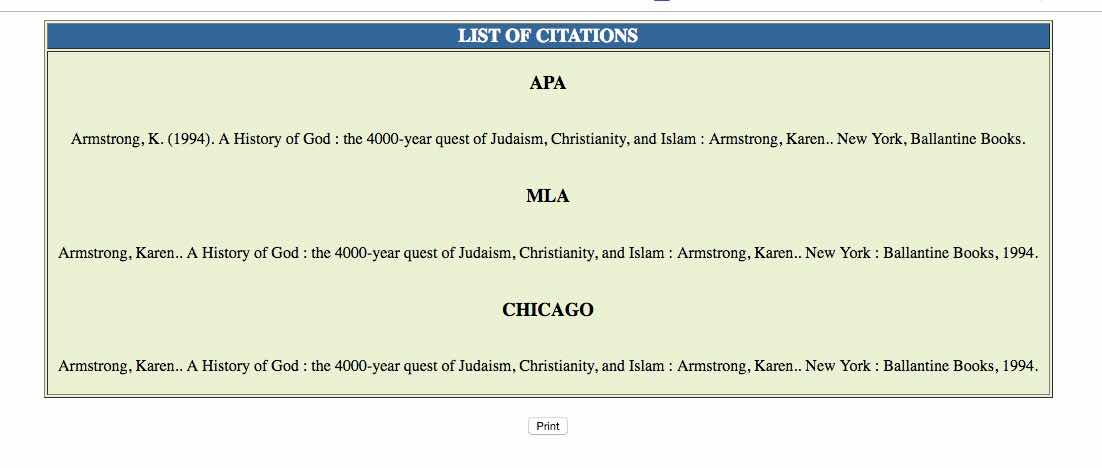
There! Copy-paste your citation format of choice to a Word document.

You can also view the book’s bibliographic data in “card display”. This layout is similar to the formatting styles of APA, MLA and CMoS since it provides the author, title, publication data, and copyright of the resource.
From MyRizal, we are now using Pagemaster 5. We are trying and testing the system. Taking notes and learning its new features. This will prepare us for the training session which Mr. Romy Sebastian will conduct.
To prepare our community and to inform them too, I have written a short easy-to-do guide in accessing books and citing them. I posted this in the Academy’s chat room.
It looks like this!
It looks like this!
Why are we smiling every time we use and access bibliographic information in our new web OPAC? It has a built-in citation builder for APA, CMoS and MLA formats! Here are screenshots of the OPAC and easy to do instructions when using the citation feature. Click each photo to read the instructions.
If all else fails, just holler. We are here to help!
#BALibWebOPAC101
#BALibServices
#citeRight
Go to the BA Library Web OPAC. URL is beaconlibrary.com/webopac/WebOpac.asp.
Type in the search box a subject or topic of choice. If you know the author or title of the resource, you can use them as keywords too.
The OPAC will show results of your search. In this case, the resource is a book. Choose a title of a book from the list.
The OPAC will present the book’s bibliographic data. At the right frame of the web page is the button “Cite” and an image of a pen and paper. Click it!
There! Copy-paste your citation format of choice to a Word document.
You can also view the book’s bibliographic data in “card display”. This layout is similar to the formatting styles of APA, MLA and CMoS since it provides the author, title, publication data, and copyright of the resource.
Tuesday, February 27, 2018


Tuesday, March 28, 2017
Information Literacy Strategies: Identifying Sources of Information
I felt compelled to review important Information Literacy skills lessons for our year 10 students. My session with the class on Sources of Information, Citations and Referencing had its ups and downs. It left me asking more questions about my role in general and ways I can specifically bridge gaps in research instruction and guidance. These are stuff that one brain couldn't answer in one sitting. But, working with a team can lead to solutions.
Nonetheless, I sent out some suggestions to my co-teachers on how we all can help students think appropriately of the sources they can use in academic work (and hopefully, in real life functions).
Nonetheless, I sent out some suggestions to my co-teachers on how we all can help students think appropriately of the sources they can use in academic work (and hopefully, in real life functions).
As of writing, one of my co-teachers tried the first suggestion for his class in World History last week. I still have to gather feedback. So, this kind of work never really ends.Here's a suggestion that may help strengthen students' skills in identifying sources of information for research and investigation tasks. Instead of saying or instructing students to "use a variety of sources" or "use appropriate sources" try phrasing it this way:- look for an article in an academic journal that tells you...- find an article in a magazine or a periodical that identifies/differentiates/presents/explains... - a first hand account of one's experiences during Martial Law by conducting an interview, reading a journal/memoir/diary entries- a website from a Pathfinder/Libguides/Online Directories of organizations, agencies, institutions- a chapter or chapters on skepticism in a Philo book/ebook...- a model, realia, map, infographic that shows part-whole relationship or systems and structures- a case study or an experiment in a scientific journal/articleThis way, we are implicitly teaching students that primary and secondary sources have their specific use depending on the tasks and questions given to them. Some students may figure this out easily, but there are students who will depend on Google and the most popular result it sends back. This technique may also help students who are new at research and inquiry tasks.Another way of setting directions is to refer students to use online databases and search engines that are less commercial and are validated by experts in the field for their content and reliability. For example:- look for a variety of appropriate resources using:the BA Library's OPACGoogle ScholarJstorEBSCOHostWorldBook OnlineThe Day
Friday, January 31, 2014
23 Mobile Things PH&SG: Thing # 3: Email Marketing

This is all I can say about this week's topic: It is new technology for me and it's taking me a while to learn the whole thing. I've done a couple of Enewsletters using FlashIssue and MailChimp. I sent this to 23 Mobile Things' email add and I'm a bit successful. I think. My blogging experience helped me figure the navigation and design of both apps but this is new stuff for me. Blogger is indeed old school. And yes, I feel old too. Hahaha!
But, I'm a self declared learner for life so I'll keep trying until I figure things out completely in MailChimp and FlashIssue. I can use either apps to repackage and reformat information needed to disseminate to readers in our high school library. Apart from news and updates on readers' services, I can use the Enewsletter as tool to communicate Information Literacy Skills topics. For example, an introduction to the research cycle may take one whole period to teach. That's an hour. As follow through, an e-newsletter will help me remind students on relevant concepts about the research cycle. The cool thing about sending this e-newsletter is that, I can make a mailing list and presto! The e-newsletter is sent to recipients.
I take it that there are two prerequisites here: one is learning the apps; two is the digestion of content. Oh Father Time, please be a friend!
 |
| E-newsletter using FlashIssue |
 |
| Ecampaign using MailChimp |
Friday, January 17, 2014
23 Mobile Things PH & SG
Filipino Librarian Karryl Kim Sagun and Joan Wee of Singapore teamed up for 23 Mobile Things PH & SG, a self paced online course that provides discussion and interaction on 23 mobile things that libraries can use to deliver services. Scheduled to run on a weekly basis for 23 weeks, participants register, log-in and engage with moderators and co-participants in the course from all over the world. Started in 2006 by Helen Blowers, 23 Mobile Things has been replicated by librarians from different countries like Denmark, Australia and New Zealand.

Today, January 17, is the start of the first 23 Mobile Things discussion. Thing #1 is Twitter. Aaron Tay from the National University of Singapore Libraries moderates.
If you have not registered, you can still catch up. Register in 23 Mobile Things. Once you have registered, join in the conversation in Twitter by using #23MThingsPHSG.
I will be moderating Thing #10 and Thing #16. See you online!
Today, January 17, is the start of the first 23 Mobile Things discussion. Thing #1 is Twitter. Aaron Tay from the National University of Singapore Libraries moderates.
If you have not registered, you can still catch up. Register in 23 Mobile Things. Once you have registered, join in the conversation in Twitter by using #23MThingsPHSG.
I will be moderating Thing #10 and Thing #16. See you online!
Monday, June 24, 2013
SLIA's Dear Librarian Reply: Ang Epekto ng Teknolohiya sa Aklatan
Heto ang aking reply kay Augie Ebreo, librarian ng Batangas University.
Hi Augie! Sabi sa research, ang mga kabataan ngayon edad 0-25, ay mas pinipiling magbasa ng ebooks at ibang babasahin na digital. Ang grupo ng mga kabtaang ito ay tinatawag na digital natives. Ang sabi rin sa research, wala namang pinagkaiba ang comprehension skills na ginagamit ng mga tao pag nagbabasa ng book or ebooks/digital content. May isa pang research na nagsasabi na mas madedevelop ang language at verbal skills ng isang bata kung iba't-ubang uri ng instructional materials ang kanyang ginagamit sa pag-aaral at sa pang araw-araw na gawaiin.Kung ito ang sinasabi ng makabagong researches, ano ngayon ang implikasyon nito sa ating mga librarian?a. Kailangan may serbisyo ang library kung saan ang aklat at ebooks/digital content ay available para sa lahat ng uri ng learners. Hindi pwedeng books lang, or virtual/digital content lang. Kailangan, balanse ito at naayon sa context ng library users. Kung gayon, kailangang makilala ng librarian ang users nya at maplano ang pag angkat at pagbuo ng isang library collection.b. Tingan kung sino-sino ang gumagawa ng ebooks at digital content at kung ito ay kayang basahin ng library users. Kung minsan, mas-friendly ang aklat dahil natural ang hitsura nito kumpara sa ereader na isang gadget. Mayroong digital divide na tinatawag, at naniniwala ako na nangyayari ito dito sa ating bansa na ang iilan lang maynkayang bumili ng ereaders at ang makaka-access sa technology ay ang mga may kakayahang bumili nito.c. Aklat man o ebook/ereader, kailangan ng user education at information literacy skills training ng gagamit. Dito papasok ang role ng librarians at libraries. Dahil ang pagbabasa at literacy ay karapatan, role ng librarians ang mag bigay ng access sa mga aklat/ereaders para sa komunidad. Role din ng librarians na turuan ang komunidad na gumamit ng aklat/ereaders.d. Dahil sa pagbabago ng kaisipan at pag gamit ng information at kaalaman, dapat, patuloy na natututo ang librarian.May gagamit pa rin ng aklat. May gagamit rin ng ebooks/ereaders. Pero, ebook man or traditional na aklat, magbabasa at magbabasa ang mga tao. READING remains. Skilled reader ba ang librarian? Kailangan, skilled and competent readers ang librarian para skilled and competent readers din ang library users.
Subscribe to:
Posts (Atom)
